What is a Service Desk?
A service desk acts as the single point of contact (SPOC) between IT teams and its users, including employees, customers, and partners.
Its primary purpose is to manage user requests, resolve technical incidents, manage IT service changes, and keep business workflows running smoothly across the full lifecycle of IT service delivery, from managing service requests to resolving service issues and planning service upgrades.
A service desk aligns IT operations directly with business strategy, integrating incident management, asset tracking, service requests, and problem resolution under a unified framework. Beyond immediate technical support, it orchestrates the broader operational ecosystem; for example, the service desk handles software licensing, coordinates service providers, and oversees third-party contracts related to ITSM.
Why is a Service Desk important?
Without a central hub, IT operations quickly descend into siloed chaos, resulting in missed support tickets, unmanaged hardware failures, and frustrated employees. A service desk provides structure, governance, and accountability, changing unpredictable IT into a measurable, repeatable operational science.
By centralising communication, standardising escalation paths, and maintaining clear oversight over assets and service contracts, the service desk assures that technical disruptions do not morph into business-critical catastrophes.
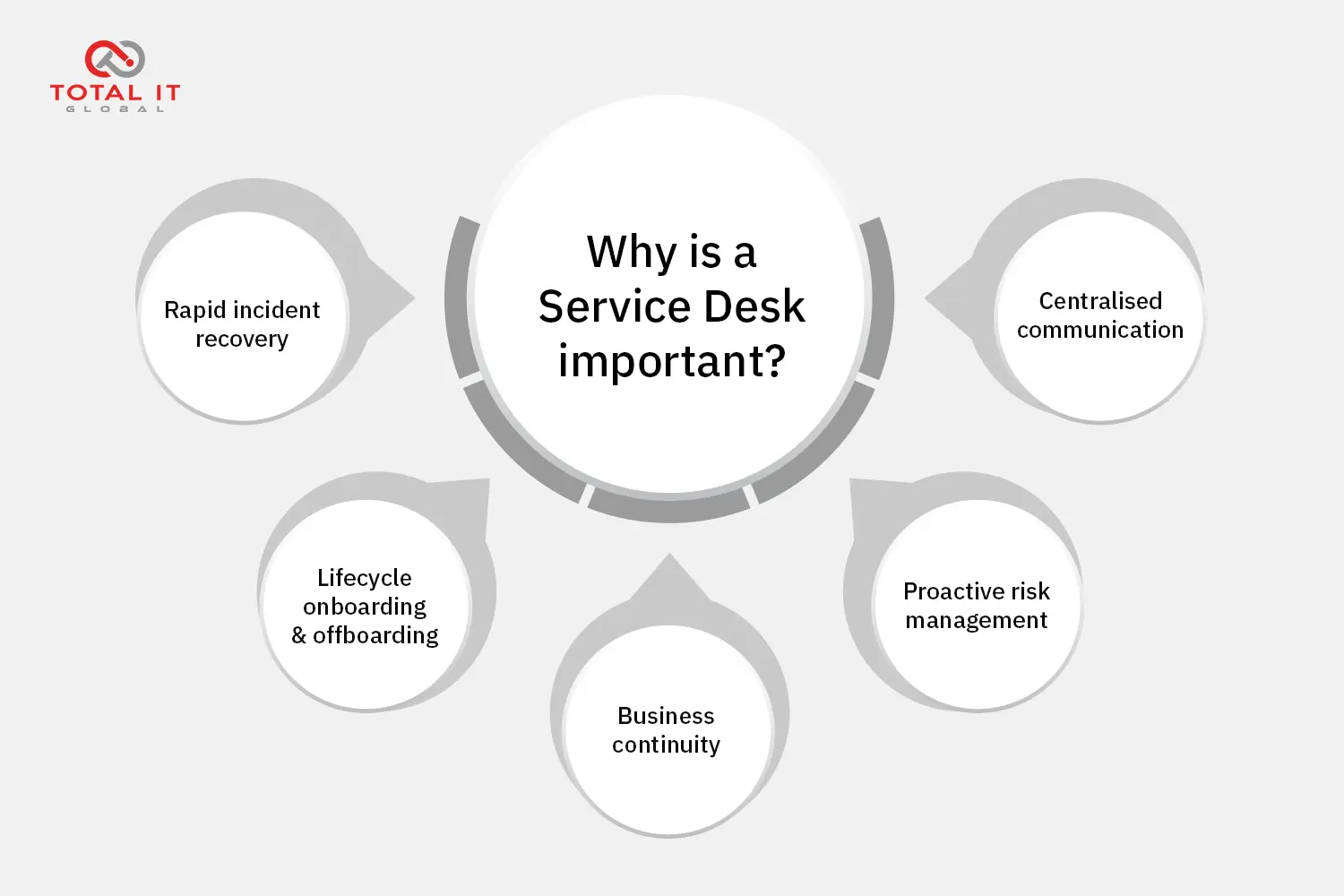
By removing single points of failure, an established service desk mitigates major operational risks across five core areas:
- Centralised communication: Eliminates fragmented support channels by establishing a single, reliable hub for reporting problems, submitting service requests, and managing expectations through Service Level Agreements (SLAs).
- Proactive risk management: Leverages modern tools, AI, and IT Service Management (ITSM) frameworks to spot recurring technical anomalies and resolve them before they cause major system outages.
- Business continuity: Serves as the frontline defence and communication hub during major IT outages or disasters, coordinating emergency response efforts and keeping key stakeholders updated.
- Lifecycle onboarding and offboarding: Streamlines the process of provisioning hardware, accounts, and security access for new hires, while securely revoking permissions when staff depart to eliminate security blind spots.
- Rapid incident recovery: Establishes clear escalation pathways for routine IT issues (such as application crashes or access failures), helping employees resume work without extended idle time.
What are the Benefits of an IT Service Desk?
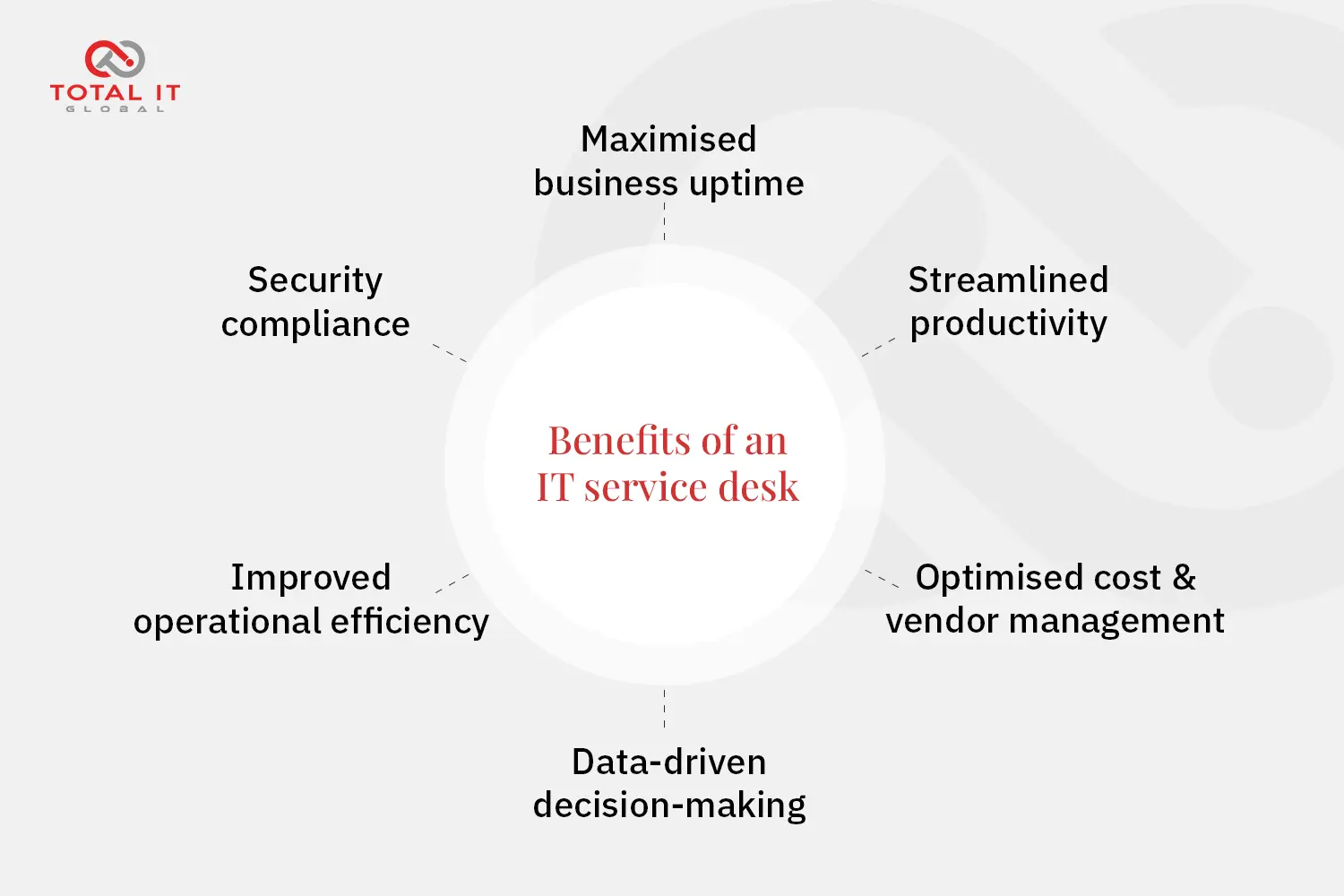
Implementing a robust, well-managed service desk delivers massive long-term value that directly impacts an organisation’s bottom line and security posture:
- Maximised business uptime: Rapid incident triage and efficient escalation pathways ensure that critical data centre outages or widespread EUC endpoint failures are resolved quickly, preventing costly operational downtime.
- Streamlined productivity: Employees spend less time waiting on technical fixes or navigating bureaucratic hurdles. Fast request fulfilment, self-service portals, and knowledge bases get staff working productively without friction.
- Optimised cost and vendor management: Tracking hardware, software licenses, external service providers, and third-party contracts under one roof eliminates redundant software spend, prevents contract blind spots, and identifies ageing hardware due for replacement.
- Data-driven decision-making: Service desk reporting tools capture granular metrics on recurring technical bottlenecks, system performance, hardware failure rates, and agent performance, giving leadership clear insights for future IT budgeting.
- Improved operational efficiency: Standardised workflows, automated ticketing systems, and knowledge bases drastically reduce manual overhead and ticket fatigue, freeing high-cost engineering teams to focus on strategic projects rather than repetitive resets.
- Security compliance: Enforces standard security protocols during routine requests, ensuring access control permissions, patch deployments, and data handling strictly comply with corporate policies.
What is the difference between a Service Desk and a Help Desk?
While the terms are often used interchangeably, veteran IT leaders recognise a distinct structural difference between the two. A help desk is tactical and reactive, built as an operational silo designed for quick break-fix resolutions. In contrast, a service desk operates as a strategic service delivery partner that manages the entire lifecycle of IT services.
| Feature | Help Desk | Service Desk |
| Primary Focus | Fixing immediate break-fix issues (broken hardware) | Managing the full lifecycle of IT service delivery and business strategy |
| Operational Scope | Tactical and reactive | Strategic, proactive, and holistic |
| Framework Alignment | Standalone ticketing | ITIL-aligned (incident, problem, change, and asset management) |
For a comprehensive breakdown of how these two differ, read our detailed article on Help Desk vs. Service Desk.
What are the core functions of an Enterprise Service Desk?
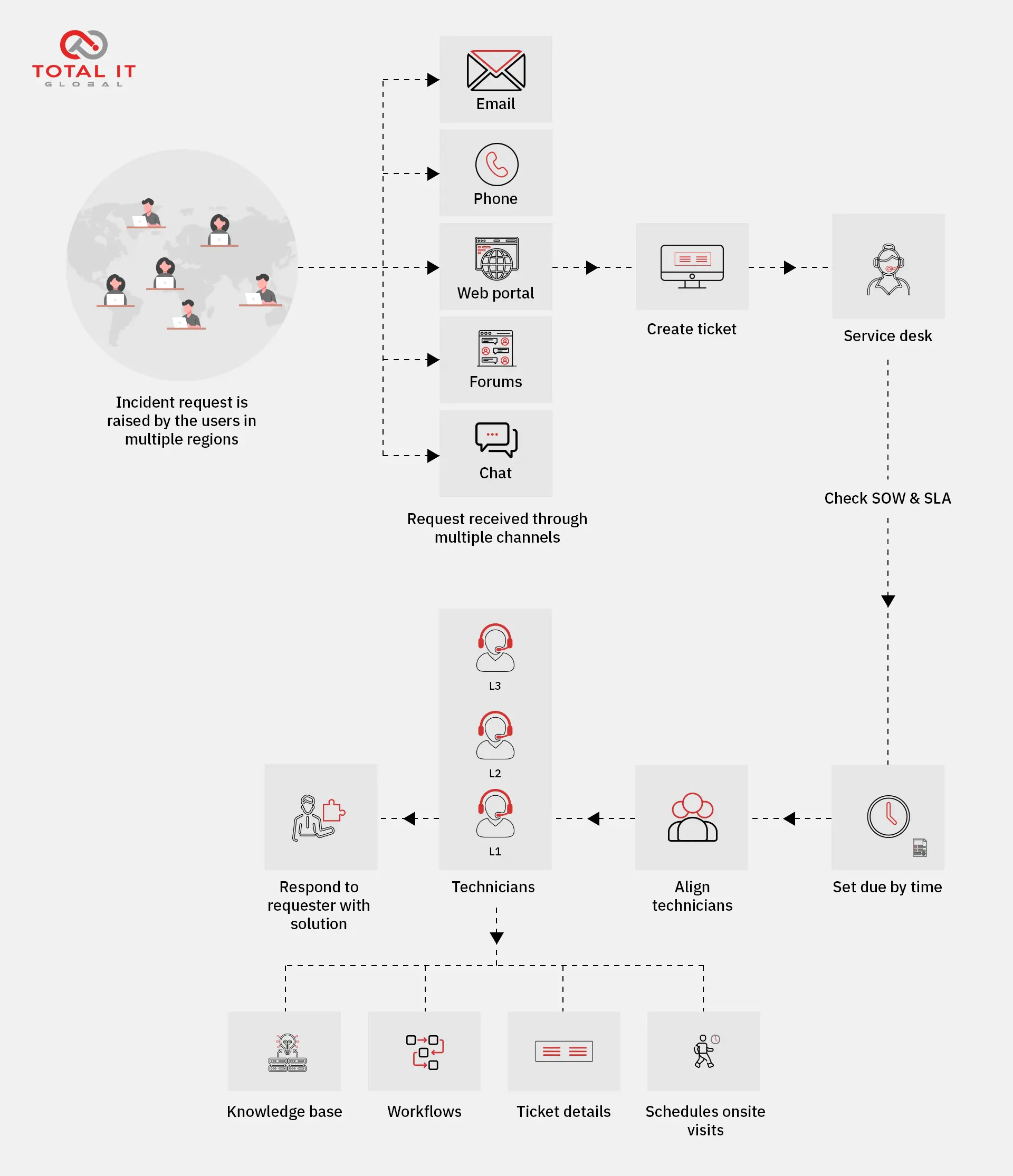
The functions of a service desk bridge daily front-line user support with broader, backend IT system management:
Operational functions (daily user support)
- Incident management: Restoring normal service operation as quickly as possible following an unexpected disruption (e.g. resolving a crashed application or network failure).
- Service request fulfilment: Handling routine, pre-approved requests, such as software provisioning, hardware upgrades, or folder permissions via standardised workflows.
- First-contact resolution (FCR): Diagnosing and resolving user issues during the initial interaction to minimise downtime and avoid unnecessary escalation to Tier 2 or Tier 3 teams.
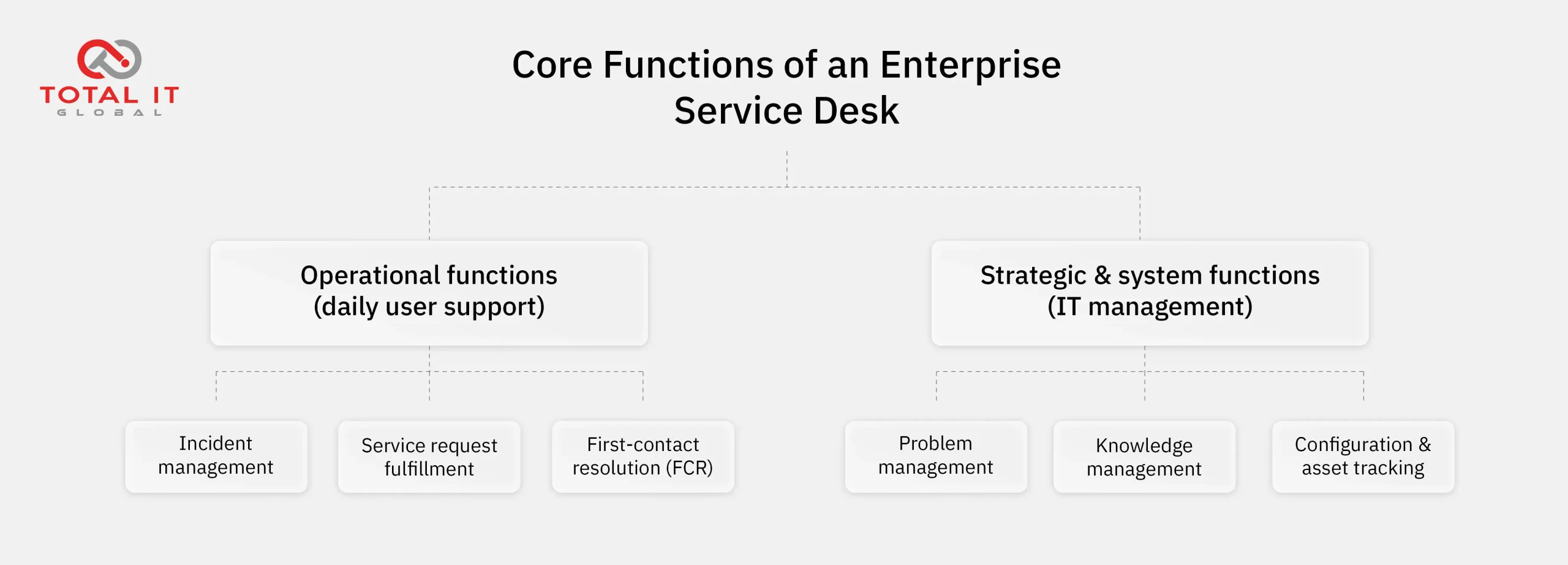
Strategic and system functions (IT management)
- Problem management: Investigating the underlying root causes of recurring incidents to prevent future disruptions across data centre and end-user environments (e.g. identifying why a specific server repeatedly drops connections).
- Knowledge management: Maintaining a centralised, searchable repository of self-service guides and troubleshooting documentation for both end users and internal IT staff.
- Configuration and asset tracking: Mapping relationships between hardware, software licenses, and infrastructure dependencies to provide full visibility during system changes.
What does a service desk look like from an IT Administration perspective?
For IT directors and operations managers, running a modern service desk requires balancing speed, security, and data visibility across distributed workforces:
- Tiered support structure (L1 to L3): Routing issues efficiently from initial triage by Tier 1 agents to specialised engineering support for complex data centre or network infrastructure issues at Tier 3.
- SLA (Service Level Agreement) governance: Monitoring metrics such as First Response Time (FRT), Mean Time to Resolution (MTTR), and ticket closure rates, so IT teams meet performance standards.
- Tooling and integration: Utilising enterprise ITSM platforms (such as ServiceNow) integrated with Unified Endpoint Management (UEM) and asset tracking databases to maintain full visibility over hardware and software assets.
How we support enterprise service operations
Managing technical support and service delivery across widespread locations requires robust infrastructure, skilled engineering talent, and round-the-clock responsiveness.

As a holistic partner for enterprise infrastructure, we support organisations by aligning robust service desk workflows with expert on-the-ground execution. Whether you need specialised field engineering for EUC support, spare-part logistics, or data centre maintenance, Total IT Global helps businesses keep their technology environments resilient, responsive, and aligned with enterprise goals.