In enterprise IT infrastructure, hardware lifecycle milestones dictate when equipment transitions from active deployment to retirement. Two terms govern this journey: End-of-Life (EOL) and End-of-Service-Life (EOSL).
While corporate conversations often treat them interchangeably, confusing the two can lead to unexpected budget crunches, compliance blind spots, or premature hardware upgrades.
End-of-Life (EOL)
End-of-Life marks the point where the original equipment manufacturer (OEM) officially stops actively marketing, manufacturing, and selling a specific hardware model or product line.
- The Operational Reality: Reaching EOL does not mean your servers, storage arrays, or laptops suddenly stop working.
- Manufacturer Support: The OEM typically continues to provide limited technical support, minor firmware patches, and replacement parts under existing service contracts or warranties.
- The Strategic Shift: EOL serves as a warning shot for IT leaders. It signals that procurement windows are closed and the hardware has entered the final phase of its commercial lifespan.
(For a detailed understanding of EOL, read our detailed blog on What is EOL?)
End-of-Service-Life (EOSL)
End-of-Service-Life is the absolute cutoff point in a hardware asset’s lifecycle. At this stage, the OEM completely terminates all official support, firmware updates, security patches, and spare parts manufacturing for that model.
- The Operational Reality: The equipment is officially unsupported by the manufacturer. If a component fails or a critical zero-day vulnerability emerges, the OEM will not provide a patch or a replacement part.
- Compliance and Security Risks: Running hardware past its EOSL date exposes enterprise networks to severe security vulnerabilities and regulatory penalties, particularly in strict industries like finance and healthcare.
The Core Difference: EOL vs. EOSL
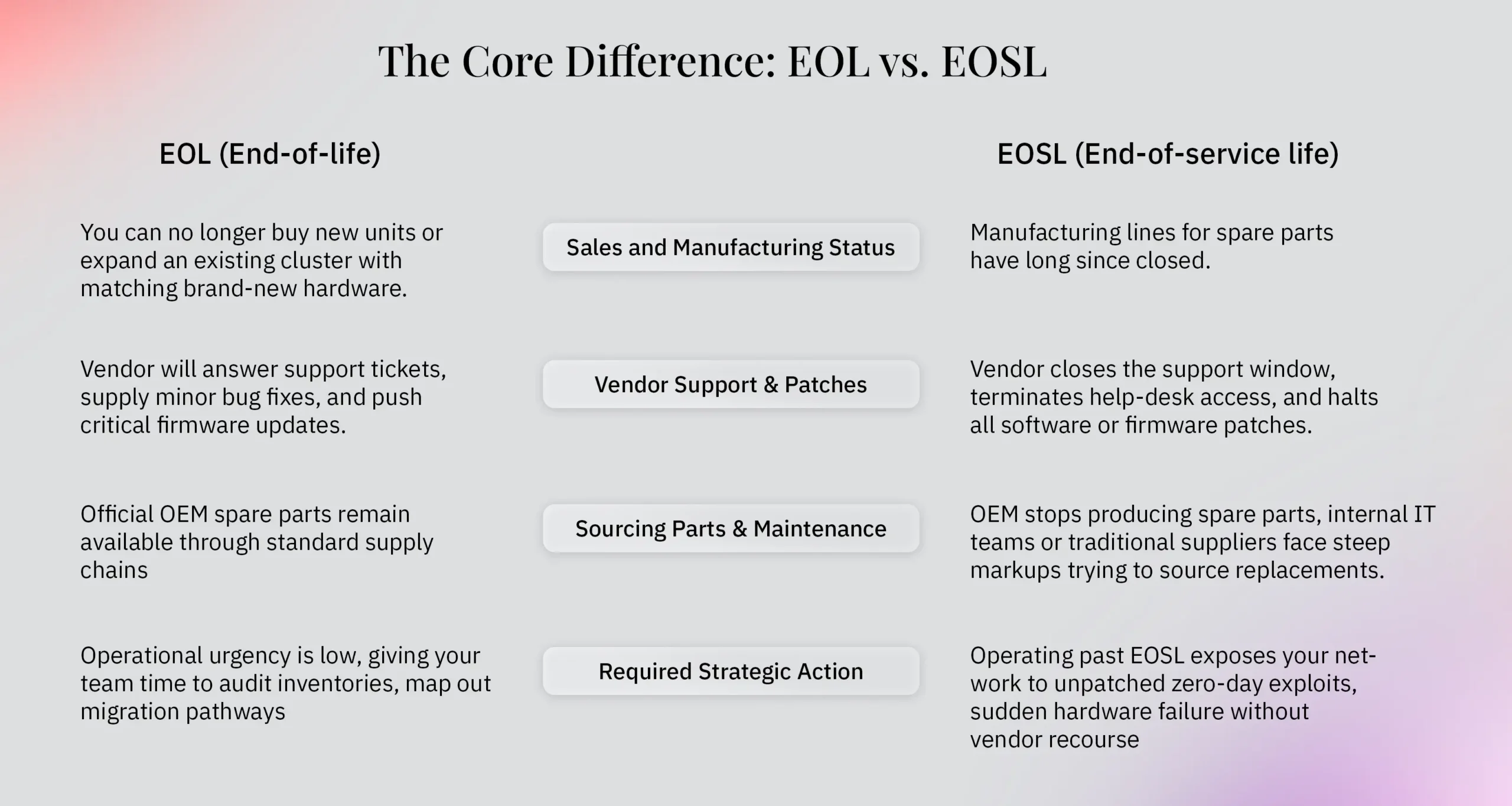
While both acronyms signal that a hardware model is ageing out, they represent two completely different milestones in the vendor’s lifecycle timeline. Understanding where a device sits between these two phases dictates your maintenance strategy, security posture, and IT budget.
1. Sales and Manufacturing Status
- EOL (End-of-Life): The OEM pulls the product from its active sales catalogues. You can no longer buy new units or expand an existing cluster with matching brand-new hardware. However, units already deployed in your environment continue running normally.
- EOSL (End-of-Service-Life): Manufacturing lines for spare parts have long since closed. Any components required for repairs must come from secondary markets, refurbished inventories, or third-party reserves.
2. Vendor Support and Firmware Patches
- EOL (End-of-Life): The manufacturer keeps a safety net in place. Under active service agreements or extended warranties, engineers will still answer support tickets, supply minor bug fixes, and push critical firmware updates.
- EOSL (End-of-Service-Life): The safety net is entirely removed. The vendor closes the support window, terminates help-desk access, and halts all software or firmware patches. Any security vulnerability discovered after this date will never be fixed by the OEM.
3. Sourcing Replacement Parts and Maintenance
- EOL (End-of-Life): Official OEM spare parts remain readily available through standard supply chains, though lead times may begin to stretch as the hardware ages.
- EOSL (End-of-Service-Life): Because the OEM stops producing spare parts, internal IT teams or traditional suppliers face steep markups trying to source replacements. This is the exact inflexion point where businesses either face forced refreshes or transition to Third-Party Maintenance (TPM) providers who specialise in sourcing hard-to-find legacy components.
4. The Required Strategic Action
- EOL (End-of-Life): This is your planning window. Operational urgency is low, giving your team time to audit inventories, map out migration pathways, evaluate multi-year budgets, or research independent maintenance options.
- EOSL (End-of-Service-Life): This is a hard deadline. Operating past EOSL without a robust risk-mitigation strategy exposes your network to unpatched zero-day exploits, sudden hardware failure without vendor recourse, and severe compliance or insurance penalties.
How EOL and EOSL differ by device type: EUC vs. Data Centre
Not all hardware ages the same way. The operational impact of EOL and EOSL varies noticeably depending on whether you look at End-User Computing (EUC) devices (such as corporate laptops, desktops, and mobile hardware) or Data Centre infrastructure (such as enterprise servers, storage arrays, and core networking switches):
- Lifecycle Speeds and Refresh Rates: EUC devices typically have much shorter lifecycles (usually 3 to 5 years) because user software demands, battery degradation, and hardware wear happen rapidly. Data centre hardware, by contrast, is built for heavy enterprise endurance, often running stable workloads successfully for 7 to 10 years or more.
- Security and Vulnerability Exposure: An EOL laptop or desktop handling sensitive remote traffic represents an immediate endpoint threat if it misses OS updates. Data centre servers are typically sequestered behind robust perimeter security, giving IT teams a bit more breathing room to manage transitions—provided they use reliable maintenance alternatives.
- Replacement and Maintenance Logistics: Swapping out an EOL laptop is straightforward and cost-effective. Replacing or repairing high-end enterprise data centre hardware requires specialised engineering, careful uptime planning, and strategic part sourcing to prevent catastrophic downtime.
What to do with EOL and EOSL equipment?
Reaching EOL or EOSL does not mean your servers, storage arrays, or endpoints immediately belong in the recycling bin. IT leaders have several distinct pathways to manage ageing infrastructure without breaking capital expenditure budgets:
- Leverage Third-Party Maintenance (TPM): Instead of surrendering to an OEM-forced hardware refresh at EOSL, partner with TPM providers like Total IT Global. Independent maintenance extends the operational lifespan of reliable data centre and enterprise hardware through flexible operational expenditure contracts, expert engineering support, and reliable spare parts sourcing (more details on Third-Party Maintenance here).
- Reallocate and Repurpose: Shift ageing EOL hardware away from mission-critical production environments and redeploy it for non-production workloads, secondary testing labs, staging environments, or disaster recovery backups.
- Plan a Structured Migration: Use the EOL warning window to map out a deliberate cloud migration or hardware upgrade path, avoiding rushed, expensive panic-purchases when EOSL arrives.
- Secure Decommissioning and ITAD: When hardware finally reaches the end of its utility, ensure secure data sanitisation (degaussing or physical drive shredding) followed by responsible e-waste recycling through certified IT Asset Disposition (ITAD) partners (learn more in our IT Asset Disposal and Decommissioning blog).
Conclusion
Understanding the boundary between EOL and EOSL gives IT leaders control over their infrastructure roadmaps. EOL gives you time to plan, while EOSL demands a definitive operational choice: upgrade, migrate, or secure independent support.
As a holistic partner, Total IT Global helps enterprises navigate this entire asset lifecycle spectrum. Whether you are managing distributed end-user computing (EUC) fleets or high-density core data centre infrastructure, we deliver agile global field support, flexible maintenance programs, and end-to-end asset management to keep your environments secure, compliant, and cost-effective.